Building a Firestore Session Service with ADK’s Service Registry
Learn how to integrate Firestore into your Agent Development Kit applications for lightweight and persistent session management.

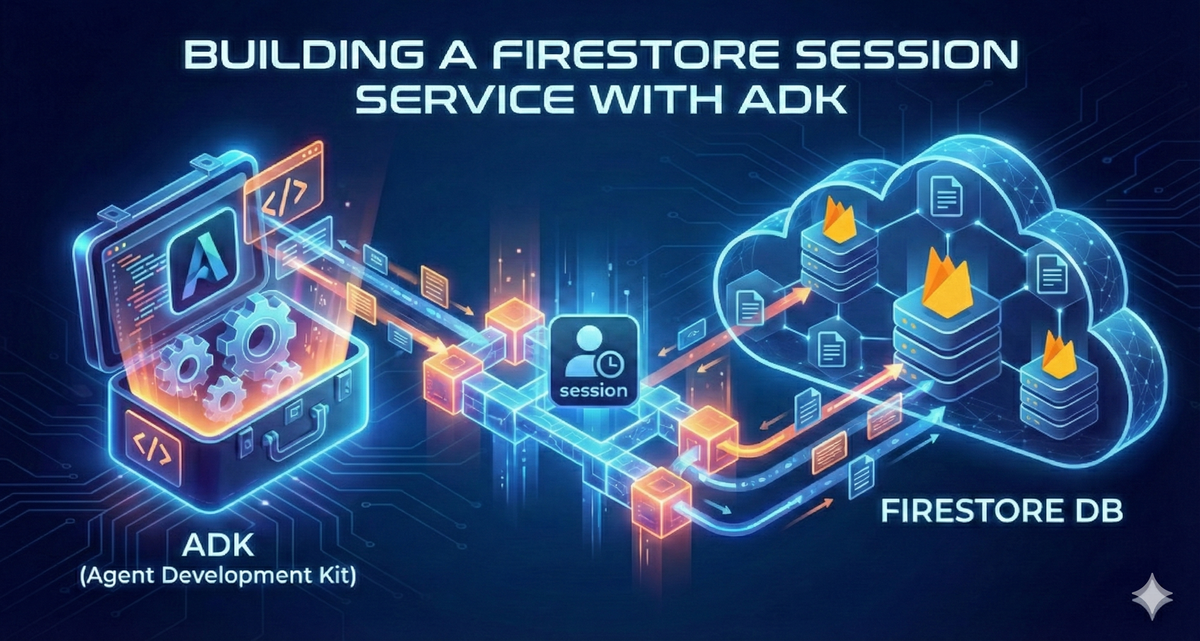
All code and examples in this post can be found at https://github.com/SZNS/szns-adk-firestore
Google’s Agent Development Kit (ADK) has greatly benefited our developers at SZNS Solutions, allowing us to deploy and develop agents with high customization and configurability.
Agentic development is great for stateless tasks, such as one-off classifications or data extractions, but many of the compounding benefits of AI agents involve creating stateful processes. Just as you would hold a conversation, developers want to maintain and persist the context of an interaction with an agent, for both the duration of their task and to revisit in the future.
Session Management Overview
ADK uses the concept of Sessions to persist individual conversations with an agent. The Session object has three key identity attributes:
app_name: The ID of the AI agentuser_id: The ID of the user conversing with the agentid: The ID of the specific conversation taking place
The Session object also contains fields to support the context of the conversation thread:
events: a list of all sequential interactions (user messages, agent responses, tool actions) that have occurred during the conversationstate: a flexible dictionary object to persist and reference arbitrary datalast_update_time: a timestamp of the last interaction in the session
A freshly created Session from an ADK agent would look like:
{
    "events": [],
    "user_id": "u_456",
    "state": {},
    "id": "7543472750996750336",
    "app_name": "7917477678498709504",
    "last_update_time": 1743683353.030133
}
And you would use a handful of those values to continue a conversation thread like this:
# Once the remote_app is identified by its ID
async for event in remote_app.async_stream_query(
    user_id="u_456",
    session_id=remote_session["id"],
    message="What is the weather in New York?",
):
    print(event)
Sessions are created, updated, and managed via a SessionService in the ADK. Each out-of-the-box implementation of this class offers a different approach to backend persistence.
InMemorySessionService- Stores Session objects in local application memory
- This is great for testing and quick iteration, but all data is lost when the server is restarted
VertexAiSessionService- Uses Google’s Agent Engine, a suite of managed services to persist Session data
- Offers a large feature set, but requires adherence to an opinionated tech stack
DatabaseSessionService- Connect to relational database services like PostgreSQL, MySQL, and SQLite to store Sessions
- Comprehensive data management, but requires additional setup and maintenance
The missing sweet spot for Session persistence would be a lightweight store that survives server restarts, but doesn’t require a heavy commitment to SQL management or tight coupling with a full ecosystem.
Google’s Firestore meets our use case for flexible persistent storage. As a serverless NoSQL document database, Firestore works well for a quick, reliable integration to manage our Sessions. These session objects translate well from Python dictionaries to Firestore documents, and vice versa.
Implementation
1. Create custom FirestoreSessionService class
To build this Firestore integration, we need to create a FirestoreSessionService class, extending BaseSessionService. We’ll be implementing four abstract methods:
create_session(...)get_session(...)list_sessions(...)delete_session(...)
A method like get_session(...) involves pulling a session document from our Firestore database, and building an ADK Session object according to its data contract.
@override
async def get_session(
    self,
    *,
    app_name: str,
    user_id: str,
    session_id: str,
    config: Optional[GetSessionConfig] = None,
) -> Optional[Session]:
    """Retrieve a session from Firestore.

    Args:
        app_name: The name of the application.
        user_id: The ID of the user.
        session_id: The ID of the session.
        config: Optional configuration for filtering events.

    Returns:
        The Session object if found, None otherwise.
    """
    session_ref = self._get_session_ref(app_name, user_id, session_id)
    session_doc = await session_ref.get()

    if not session_doc.exists:
        return None

    session_data = session_doc.to_dict()

    # Load events from subcollection
    events_ref = session_ref.collection(self.EVENTS_SUBCOLLECTION)
    events_query = events_ref.order_by("timestamp")

    # Apply filtering if config is provided
    if config and config.after_timestamp:
        events_query = events_query.where(
            "timestamp", ">", config.after_timestamp
        )

    # Apply num_recent_events limit on the server for efficiency
    if config and config.num_recent_events:
        events_query = events_query.limit_to_last(config.num_recent_events)

    events = [_dict_to_event(doc.to_dict()) async for doc in events_query.stream()]

    return Session(
        app_name=session_data["app_name"],
        user_id=session_data["user_id"],
        id=session_data["session_id"],
        state=session_data.get("state", {}),
        events=events,
        last_update_time=session_data.get("last_update_time", 0.0),
    )
The full implementation of the FirestoreSessionService can be found in our GitHub repository.
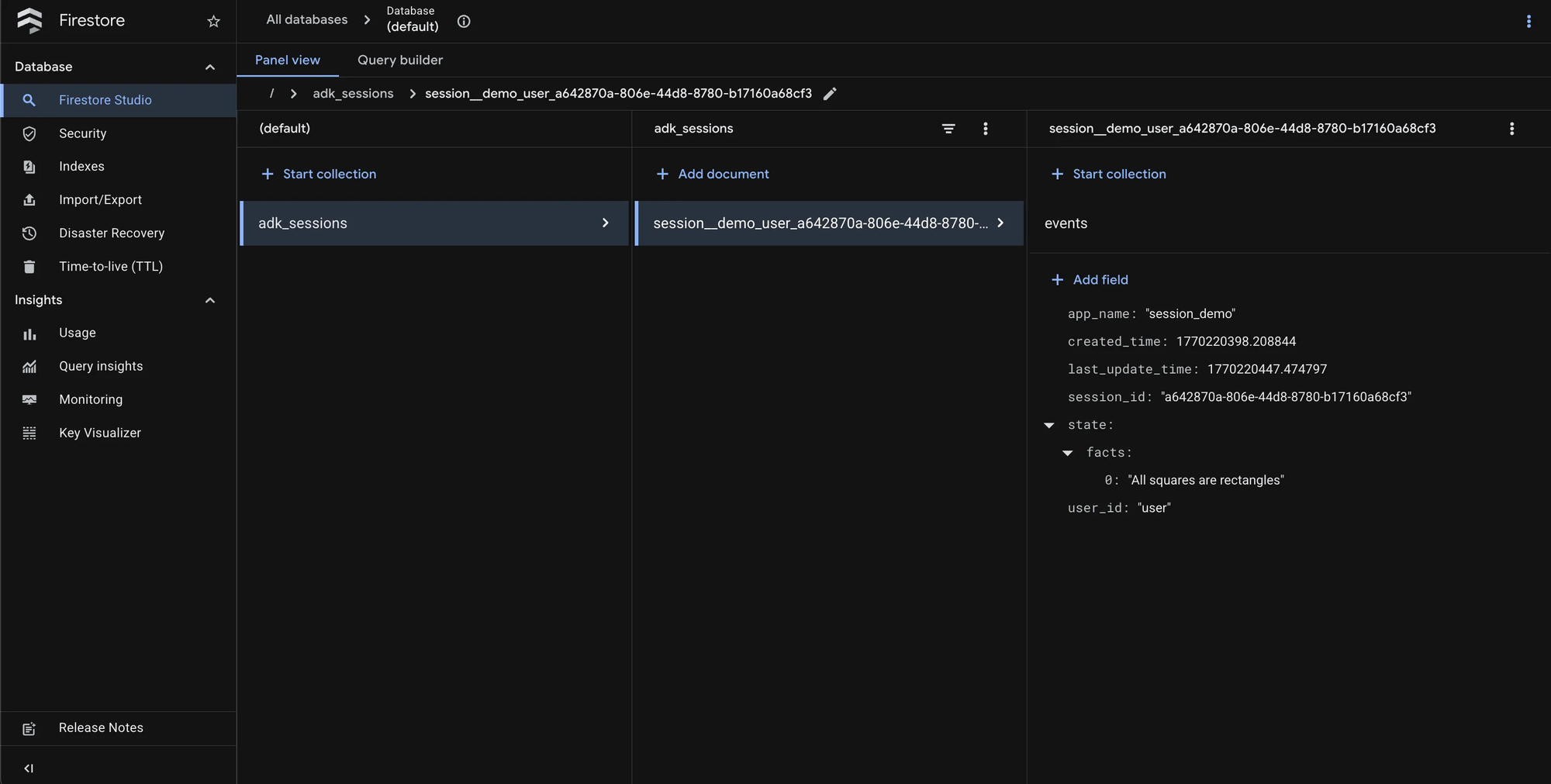
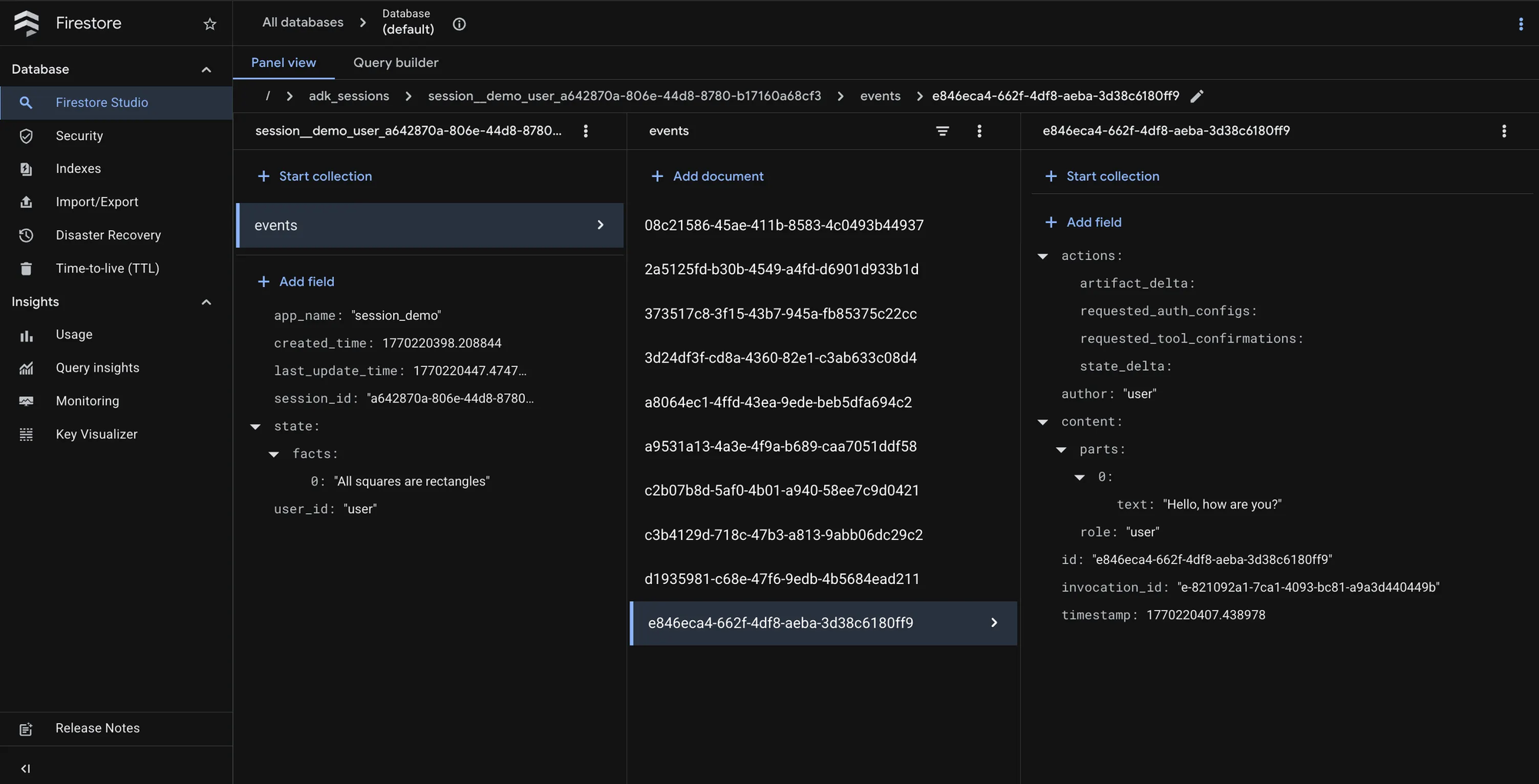
To handle potentially long conversation histories without hitting Firestore's 1MB document size limit, we designed a sub-collection data model.
- Primary Collection:
adk_sessions: Stores light metadata (session_id,user_id,state,last_update_time). - Sub-collection:
events: Stores each conversation turn (user message, agent response, tool call) as an individual document. This allows conversations to grow indefinitely.
Here's a full example of the Firestore data model:
Session Document
Collection: adk_sessions
Document ID: my__app_user__123_550e8400-e29b-41d4-a716-446655440000
{
  "app_name": "my_app",
  "user_id": "user_123",
  "session_id": "550e8400-e29b-41d4-a716-446655440000",
  "state": {
    "user_name": "Alice",
    "preferences": {
      "language": "en",
      "timezone": "America/Los_Angeles"
    },
    "cart_items": ["item_001", "item_002"],
    "last_viewed_product": "prod_xyz"
  },
  "created_time": 1706745600.123,
  "last_update_time": 1706749200.456
}
Events Sub-collection
Path: adk_sessions/{session_doc_id}/events
Sample Event: Initial User Message
Document ID: evt_001
{
  "id": "evt_001",
  "invocation_id": "inv_abc123",
  "author": "user",
  "timestamp": 1706745600.123,
  "content": {
    "role": "user",
    "parts": [
      {
        "text": "What products do you have on sale?"
      }
    ]
  },
  "actions": null
}
2. Register FirestoreSessionService
The next step is to register the FirestoreSessionService through the Service Registry. Introduced in version 1.17.0 of the Agent Development Kit, the Service Registry is a singleton that keeps a mapping of platform-offered SessionServices (like InMemorySessionService, etc) and offers the ability to add custom ones.
We have two entry points for registering FirestoreSessionService, through Python or YAML, by defining either a services.yaml or a services.py . You can define both, but if there are any overlapping session services defined in them, services.py will take precedence.
In services.py, we will define a factory method, get the service registry singleton, and add our new session service into the mapping.
def firestore_session_factory(uri: str, **kwargs) -> FirestoreSessionService:
    # URI would look like "firestore://<project_id>",
    # falling back to an environment variable if project ID is not set
    parsed = urlparse(uri)
    project_id = parsed.netloc or os.getenv("GOOGLE_CLOUD_PROJECT")

    return FirestoreSessionService(project_id=project_id, uri=uri, **kwargs)

# Register session factory
get_service_registry().register_session_service(
    "firestore", firestore_session_factory
)
In services.yaml , you can define the scheme name, the type, and the fully qualified class name to register the new service.
services:
  - scheme: firestore
    type: session
    class: firestore_session_service.FirestoreSessionService
ADK will automatically look for and load these files from your agent directory at run time to register any custom services.
Demo
Prerequisites
- Python 3.10+
- Google Cloud SDK
To see the FirestoreSessionService in action, we can checkout our GitHub repository and navigate to the first firestore_session_service/ directory.
szns-adk-firestore/
├── README.md
└── firestore_session_service/
    ├── README.md
    ├── pyproject.toml
    ├── requirements.txt
    ├── services.py
    ├── services.yaml
    ├── firestore_session_service/
    │   ├── __init__.py
    │   └── firestore_session_service.py
    └── session_demo/
        ├── __init__.py
        └── agent.py
From there, we can create and activate a Python virtual environment.
# Create virtual environment
python -m venv .venv

# Activate it (Linux/macOS)
source .venv/bin/activate

# Activate it (Windows)
.venv\Scripts\activate
Next, we will install Python dependencies.
# Using pip
pip install -r requirements.txt

# Or using pip with pyproject.toml (editable install)
pip install -e .
Then configure your environment with a Google Project ID, and choose an option for accessing the underlying AI model, either through a Google AI Studio key or by enabling Vertex AI.
You can set the environment variables in your command shell or by using the .env.example template.
# Authenticate with GCP
gcloud auth application-default login

# Required: a GCP Project with Firestore enabled
export GOOGLE_CLOUD_PROJECT=your-project-id
gcloud services enable firestore.googleapis.com

# AI Model Authentication
# Get your key from: <https://aistudio.google.com/apikey>
export GOOGLE_GENAI_API_KEY=your-api-key

# OR Enable Vertex AI mode
gcloud services enable aiplatform.googleapis.com
export GOOGLE_GENAI_USE_VERTEXAI=TRUE
export GOOGLE_CLOUD_LOCATION=us-central1

# Optionally use the .env.example for persistent configuration
cp .env.example .env
Make sure you have a default Firestore database initialized in your Google Cloud project.
# Visit <https://console.cloud.google.com/firestore/databases>
# to create a new "(default)" database in "Native Mode",
# or run this gcloud command, in a location of your choice

gcloud firestore databases create --location=us-central1
To start the ADK server, run this command in your first firestore_session_service/directory.
adk web . --session_service_uri=firestore://
Visit the local application at http://127.0.0.1:8000 and choose session_demo from the agent dropdown and begin chatting with your agent. It has three tool functions to demonstrate its ability to persist memories: remember_fact, recall_facts , clear_facts .
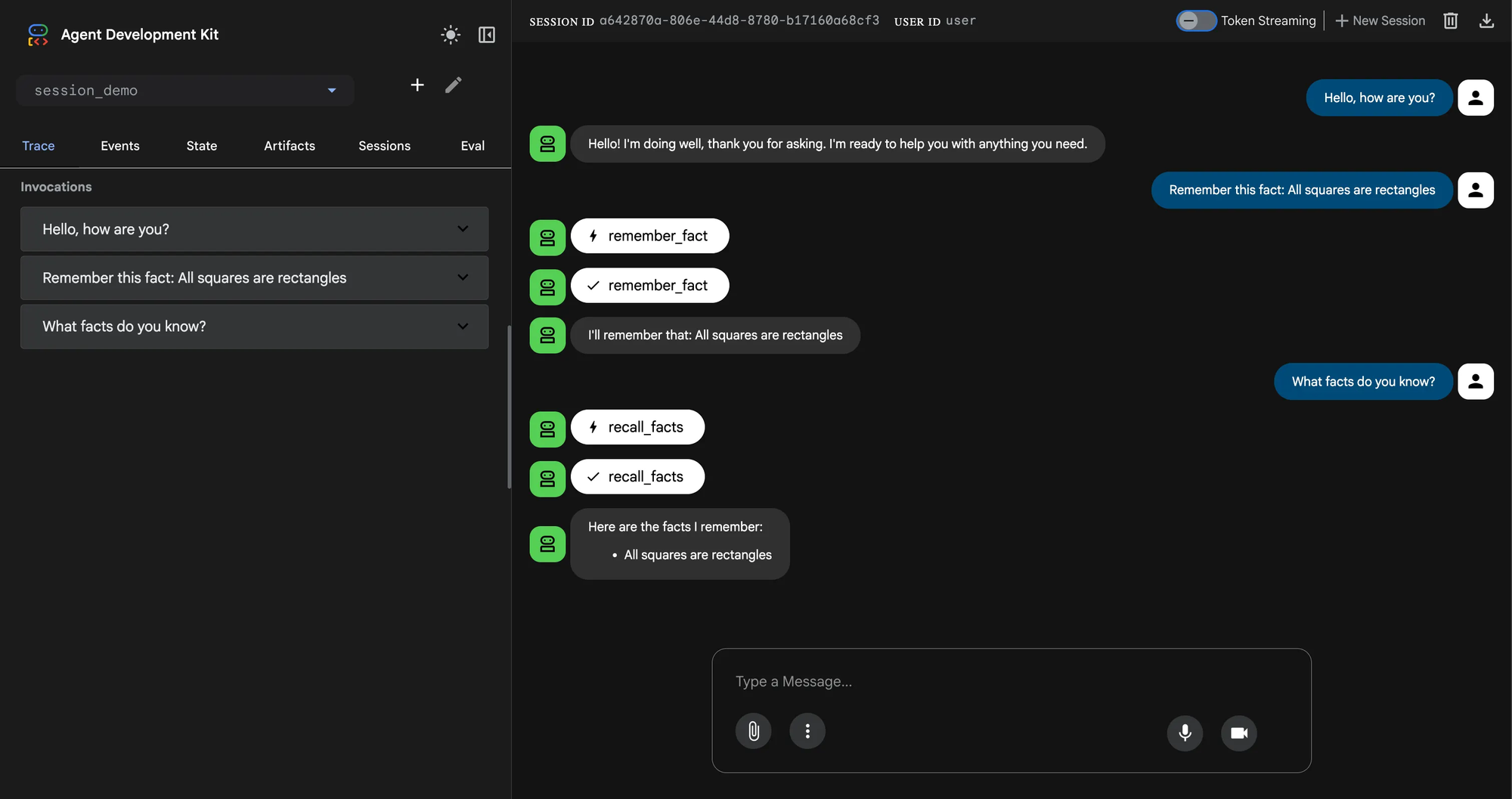
If we navigate to our Firestore collection in the Google Cloud console, we can see our adk_sessions collection, with metadata stored in documents and the events stored as a sub-collection.
Conclusion
Agent Development Kit supports both robust persistence strategies out-of-the-box and allows the flexibility of defining our own, like we have done with Firestore. As new technologies or project constraints arise, we can continue to extend ADK with more creative and optimized integrations.
Here at SZNS Solutions, custom implementations like the Firestore Session Service have helped us deliver faster and more resilient results for our clients.
For more information on how SZNS Solutions can help you and your business, reach out to us here: https://szns.solutions/contact